Before a search engine can rank a page or a post, it needs to index it. A crawler must discover a piece of content before it can evaluate if it is a valuable addition to its index. One of the ways crawlers discover pages, is by crawling XML sitemaps. After a page has been indexed, a search engine can rank the piece of content if it fits the users search query best. Yoast SEO makes it easy for you to determine what should be indexable.
Show x in search results?
Determining what has to be indexed by crawlers and what not tends to be hard to understand and it’s easy to make a mistake. You wouldn’t be the first to have unknowingly set a whole post type to noindex, making it unavailable to search engines. We’ve thought long and hard about this and drastically simplified this process for you. Now it all boils down to asking you a straightforward question: Do you want x to appear in search engines?
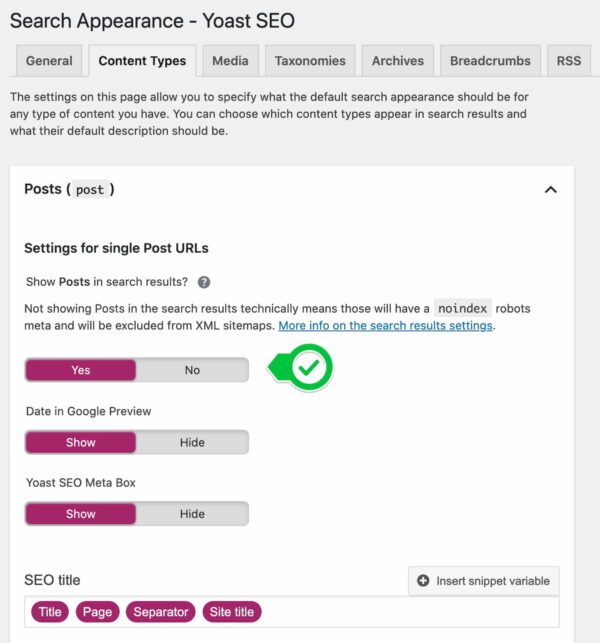
You can find the individual settings for making your content available for indexing in the corresponding parts of Yoast SEO. You’ll find the settings for posts and pages in the Content Types part of the Search Appearance tab. Taxonomies like categories and tags can be found in the Taxonomies tab.
By saying Yes to the ‘Show Posts in search results’ question in the post settings, for instance, you make sure that your posts will appear in the XML sitemap and, therefore, in the search results.
If you want to exclude something, you can switch this toggle to No, and the taxonomy or post type will not appear in the XML sitemap. Because of that, it will not appear in the search results. Whenever you set something here to not appear in search engines, it will be noindexed and kept from the XML sitemap.
Read more: Why doesn’t Google index my content properly? »
Exclude individual posts
If you really don’t want a specific URL to show up in the search results you’ll need to add a noindex, follow tag. Leaving it out of your XML sitemap doesn’t automatically mean Google won’t index the URL. If Google can find it by following links, Google can index the URL.
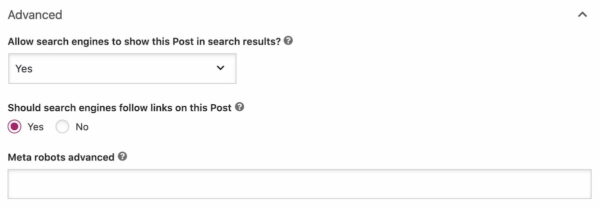
You can also exclude individual posts from the XML sitemaps from the Yoast SEO meta box in the post editor. Click on the Advanced tab and select No to the ‘Allow search engines to show this Post in search results?’ question.
View your XML sitemap
You should always check your sitemap to see if the content you want to include appears in the XML sitemap. While you’re there, you should also check if the content you want to exclude from the sitemap doesn’t appear in it.
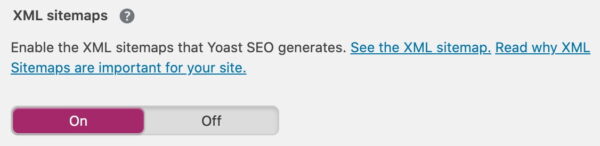
You can find your XML sitemap by going to General > Features > XML Sitemaps > ? (click on the question mark).
We’ve taken away a lot of the confusion around indexing content and XML sitemaps by simplifying things. But, most importantly, it is now so much easier to determine what should and should not appear in search results.
More on XML sitemaps
XML sitemaps are a kind of treasure map for search engine robots. They crawl them to discover new or updated content on your site. Every site benefits from a sitemap. Your rankings won’t soar if you add one, but it does help the crawlers to discover your content that much easier. If you need more information about the use of XML sitemaps on your site, we have some further reading for you:
Keep reading: What is an XML sitemap and why should you have one? »
Read on: The sense and nonsense of an XML sitemap »
Keep on reading: XML sitemap insights for developers »
The post Indexing in Yoast SEO: Show x in search results? appeared first on Yoast.

