
LinkedIn have joined Facebook and Twitter in releasing an “official” share button. Note that this doesn’t really represent groundbreaking functionality – many social bookmarking plugins allow you to share posts to LinkedIn. But this official version does come with the option of a ‘share’ count, for that all-important ‘social proof’, and 3 clean button designs. I’m sure plugins will pop up momentarily to enable adding the button to your WordPress site, but if you’re feeling geeky and want to add it right away, here’s how.
There are three versions of the button:
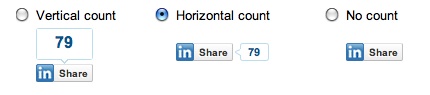
In order to add the button to your site, you will have to edit your theme files slightly. So let’s say you want to add it to your Single Posts, you would open up single.php and add one of the following sets of code inside the Loop.
Vertical Count Button
Horizontal Count Button
No Count Button