PPC for ecommerce operates differently from PPC for lead gen or SaaS.
The way campaigns learn, the volume of conversion data, and the role each platform plays all require a distinct approach.
After shifting into ecommerce, it became clear which fundamentals matter most.
The guidance in this article reflects those lessons and can help whether you’re new to ecommerce PPC or building on existing experience.
We’ll look at how the core differences between ecommerce and non-ecommerce models influence PPC strategy and how to use each platform’s strengths to support your products.
1. Performance Max is built for ecommerce
Google Ads is a key platform for ecommerce businesses largely because of Performance Max campaigns.
I’d go as far as saying PMax works best for ecommerce. Nine times out of 10, nonecommerce businesses will struggle with it.
PMax requires substantial data to learn and improve, and ecommerce brands generate that data quickly through higher sales volumes and lower ticket sizes.
Non-ecommerce brands that drive large numbers of leads may be candidates for PMax, but for most ecommerce businesses, it can deliver strong results.
To get the most out of PMax, you must:
- Optimize your feed.
- Segment your campaigns.
- Ensure conversion tracking is in place.
Feed optimization
Optimizing your feed is one of the easiest ways to improve PMax performance, and it can have an outsized impact.
Focus on refining your product titles and descriptions so they are well-written, use the available character limits, and include your keywords.
The process is simpler now. You can:
- Export your feed from Google Merchant Center.
- Upload it to ChatGPT.
- Ask for optimized titles and descriptions.
The more direction you provide, the better the output.
Give title-length limits, your primary keywords, preferred placement, and any brand tone guidance.
Once updated, reupload the feed to Google Merchant Center.
Campaign segmentation
The better your feeds are categorized, the easier it will be to segment campaigns in Google Ads.
By default, you can segment your feed by:
- Product type.
- Condition.
- Brand.
- Channel.
These fields are defined in Google Merchant Center when you edit a product.
You can also create custom labels, which are powerful and enable you to build your own categorization system.
For example, you can use custom labels to define products by:
- Sales location.
- Status.
- Whether an item is on sale or overstock.
In the example below, we define a product with “Source Market = au” and “Status = stranded,” meaning it is overstock and needs to be sold.
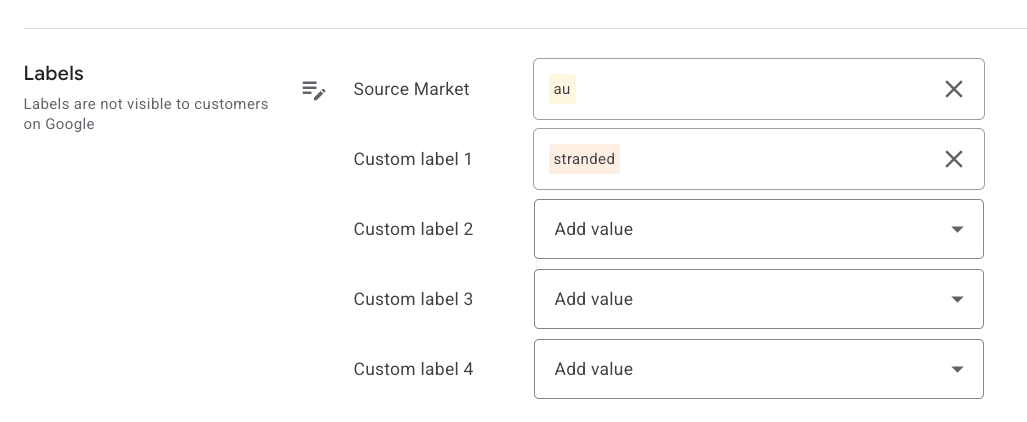
This data then flows into Google Ads, where I can structure campaigns based on these custom labels.
I usually begin with one large PMax campaign that is segmented internally.
Once certain labels deliver a higher ROAS than others, I break them into separate campaigns and give them dedicated budgets.
This serves two purposes:
- Ensuring that top-performing labels get the exposure they need.
- Giving underexposed labels more opportunity to prove themselves within the original campaign.
Conversion tracking
The last key consideration with PMax is ensuring you have accurate conversion tracking.
Ideally, you should pull in not only sales numbers but also revenue and costs for each product.
Shopify makes this easier because it integrates directly with Google Ads and sends your conversion and revenue data into both Google Merchant Center and Google Ads.
With this data in place, you can set up automated bidding strategies, such as tCPA or value-based bidding.
You can also run campaign experiments to see which bidding methods deliver a stronger return on advertising spend (ROAS).
Dig deeper: 6 tips for successful ecommerce search campaigns
2. Amazon is the strongest ad platform for ecommerce
I’m surprised by how many ecommerce businesses are not on Amazon and not running Amazon Ads.
Amazon is likely the best advertising platform for an ecommerce business when used properly.
Several key features make it stand out and worth serious consideration.
Transparency
Amazon is more transparent with its data than its competitors as advertisers receive far more detailed information.
From Google and Meta, you may get keyword-level metrics like impressions, clicks, CPCs, and CTRs.
Even then, as much as 80% of that data can be hidden.
While click-level data is useful, it only reflects activity during the search phase, not what happens at the product level.
Amazon goes a level deeper. It provides information about:
- Your target keywords and how they convert compared with your competitors.
- Actual conversion rate data for your own SKUs and for the overall market for the keywords you are targeting.
Amazon’s Search Query reports show your conversion rates alongside market conversion rates.
The screenshots below show the Amazon Search Query Report with product-level data for each keyword driving traffic.
The first one shows impressions and clicks for the advertiser’s product (“Brand Count”) versus the aggregated market (“Total Count”).
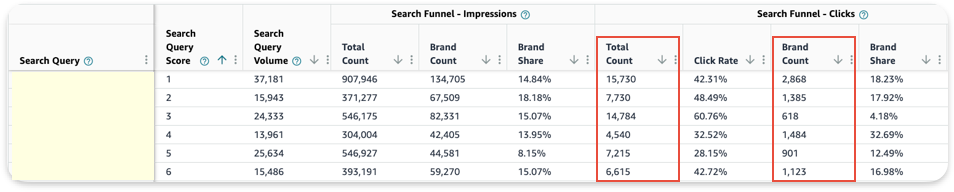
The second screenshot shows the same for add-to-carts and purchases. From these numbers, you can derive key insights into conversion rates.

Higher conversion rates
Because Amazon is a closed platform, the listings, ads, and purchase funnel all occur in one environment.
Other platforms like Meta typically send customers off-site to your website.
As a result, Amazon tends to deliver far higher conversion rates and more accurate data.
Where a website might convert at 5%, it’s not unusual to see 20% on an Amazon listing.
This also reduces attribution issues.
The full customer journey – impressions, clicks, add-to-carts, and sales – is captured in one place.
This seamless experience removes much of the guesswork from understanding performance and measuring results.
Rankings philosophy
Amazon also takes a different approach to rankings.
Google Ads states that ad spend and organic rankings are not directly related.
Regardless of how much you spend on PMax or other campaigns, it will not influence your organic rankings.
While this sounds fair, in practice, it leaves unclear guidelines and creates confusion about how to rank products on Google.
It often leads advertisers to spend heavily on experts who claim to solve the mystery of organic rankings, even though many are not fully confident in their own methods.
Amazon takes a different approach.
While not explicitly stated, it is widely understood in the industry that ads play a pivotal role in organic rankings.
Amazon’s algorithm ranks product listings for keyword searches based largely on conversion rate.
When an advertiser runs ads, they generate more clicks and sales, which in turn produce a conversion rate.
That conversion rate is used to determine rankings against competitors.
Products with higher conversion rates are more likely to rank higher.
This system allows advertisers to quickly understand what it takes to rank for a keyword.
If conversion rates are low compared with the market, the offer needs to be improved.
Skilled marketers can use this data to build plans – improving their offers, adjusting pricing, testing different keyword sets, and reevaluating results.
By comparison, SEO on Google remains far less transparent.
For advertisers experienced with Amazon, this means:
- More transparent and lower-funnel data.
- More engaged customers with higher conversion rates.
- Better attribution and less guesswork about platform value.
- More control over rankings through ad management and offer improvements.
All of this makes Amazon a powerful platform for ecommerce marketers.
Dig deeper: Optimizing for Amazon branded search: Best practices to boost visibility.
Get the newsletter search marketers rely on.
3. Social platforms are not built to drive conversions
Social platforms are important for ecommerce businesses, but for most products, they are not ideal for driving direct conversions.
If you want to generate sales quickly and have a small budget, Amazon Ads or PMax should come first.
This is true for most ecommerce brands, though social can work for direct lead generation if you have a fun or highly engaging product.
For the remaining 90%, social media is still a critical part of your marketing strategy and should be integrated thoughtfully.
It’s an effective channel for generating awareness and building customer lists.
Here are the primary ways to use it.
Customer lists
Your email list is a valuable asset, and you should prioritize building it.
Email allows you to run promotions, sell overstock, introduce new products, cross-sell, and more.
Social is a strong tool for growing these lists.
Competitions and giveaways, in particular, have been a cost-effective way for us to build customer lists.
Everyone loves a free giveaway.
Awareness
Social and display are strong awareness channels.
You might pay $10 for a single click on PMax, while on social you could pay a $10 CPM for 1,000 impressions.
Building impressions and awareness is especially important for products that are new to market, and social handles this well.
These campaigns should not be judged on immediate sales but on the visibility they generate.
Remarketing funnels, both in-platform and cross-platform, are effective for ecommerce.
Social’s strength is its ability to generate awareness and buzz.
Platforms like Meta let advertisers gauge engagement through metrics such as video view rates and ad frequency.
Using social to measure engagement, then building customer lists for additional remarketing – either in-platform or to feed signals into your PMax campaigns – is an effective way to refine audiences as they move down the funnel.
4. Dashboarding is essential for visibility and profitability
The value of third-party dashboards cannot be overstated.
They allow you to track performance across multiple platforms and ad consoles.
You might be:
- Selling products on Shopify and Amazon.
- Running ads on Amazon, Google, Facebook, and TikTok.
- Sending automations and EDMs through Klaviyo.
This can get messy quickly. How do you track everything and understand what is working and what is profitable?
The goal of a great dashboard is to simplify your workflow and provide clear insight and context.
I’ve written elsewhere about what makes a strong dashboard report.
At its most basic level for ecommerce, you want a dashboard that can:
- Combine multiple data sources in one place.
- Simplify large amounts of data into meaningful reporting so you can make good decisions.
Sellerboard has been an excellent tool for us in solving these two problems.
- It connects to Amazon and Shopify, as well as ad platforms via API. It pulls in revenue and associated costs down to the SKU and order ID level. This allows us to isolate each SKU and attribute all variable costs from various platforms.
- It calculates profitability and ROI for each SKU and shows where that performance is coming from. We can see what happens when we pause a platform and how it affects overall revenue, giving us insight into what drives results for each product.
Dig deeper: How to deliver monthly PPC reports clients love
Where these ecommerce PPC insights lead you next
Understanding how ecommerce changes the way PPC platforms behave is essential to making the right decisions.
While this isn’t an exhaustive list, these are the lessons I wish I had when getting started, and they continue to shape how I approach campaigns today.
I hope these takeaways help you build or support successful ecommerce programs with clearer insight and stronger performance.
Contributing authors are invited to create content for Search Engine Land and are chosen for their expertise and contribution to the search community. Our contributors work under the oversight of the editorial staff and contributions are checked for quality and relevance to our readers. Search Engine Land is owned by Semrush. Contributor was not asked to make any direct or indirect mentions of Semrush. The opinions they express are their own.


